Linux性能测试UnixBench一键脚本

作者 https://teddysun.com/245.html

UnixBench是一个类unix系(Unix,BSD,Linux)统下的性能测试工具,一个开源工具,被广泛用与测试linux系统主机的性能。
Unixbench的主要测试项目有:系统调用、读写、进程、图形化测试、2D、3D、管道、运算、C库等系统基准性能提供测试数据。

最新版本UnixBench5.1.3,包含system和graphic测试,如果你需要测试graphic,
则需要修改Makefile,不要注释掉”GRAPHIC_TESTS = defined”,同时需要系统提供x11perf命令gl_glibs库。
下面的脚本使用了最新版UnixBench5.1.3来测试,注释了关于graphic的测试项
(大多数VPS都是没有显卡或者是集显,所以图像性能无需测试),运行10-30分钟后(根据CPU内核数量,运算时间不等)得出分数,越高越好。


测试方法:

wget --no-check-certificate https://github.com/teddysun/across/raw/master/unixbench.sh
chmod +x unixbench.sh
./unixbench.sh

一键测试脚本bench.sh

作者 https://teddysun.com/444.html

使用方法:
命令1:

wget -qO- bench.sh | bash
或者

curl -Lso- bench.sh | bash
命令2:

wget -qO- 86.re/bench.sh | bash
或者

curl -so- 86.re/bench.sh | bash
备注:
bench.sh 既是脚本名,同时又是域名。所以不要怀疑我写错了或者你看错了。

下载地址:
https://github.com/teddysun/across/blob/master/bench.sh

## bench-sh-2

https://github.com/hidden-refuge/bench-sh-2


bench-sh-2 Benchmark Script Version 2 Demo Output: http://pastebin.com/zqtBpZDU Parameters Help Page: ./bench.sh -h System Info + Speedtest IPv4 + Drive Speed: ./bench.sh Classic mode. This will use 1 GB bandwidth! System Info + Speedtest IPv6 + Drive Speed: ./bench.sh -6 IPv6 only speed test. This will use 1 GB bandwidth! System Info + Speedtest IPv4 & IPv6 + Drive Speed: ./bench.sh -46 or ./bench.sh -64 Dual stack speed test. This will use 2 GB bandwidth! System Info: ./bench.sh -sys System information only. Drive Speed: ./bench.sh -io Drive speed test via DD only. System Info + Speedtest IPv4 + Drive Speed + System Benchmark: ./bench.sh -b Classic mode with system benchmark. This will use 1 GB bandwidth! System Info + Speedtest IPv6 + Drive Speed + System Benchmark: ./bench.sh -b6 IPv6 only speed test with system benchmark. This will use 1 GB bandwidth! System Info + Speedtest IPv4 & IPv6 + Drive Speed + System Benchmark: ./bench.sh -b46 or ./bench.sh -b64 Dual stack speed test with system benchmark. This will use 2 GB bandwidth.
持续更新中

git 当前代码分支 版本信息

在代码发布中有时候,需要把当前的 git 分支信息,最后一次提交的提交信息做个展示,那么把这些信息输出到 VERSION 文件供读取展示使用

echo $(git symbolic-ref --short -q HEAD | tr "\n" " ")$(git log --pretty=format:"%h %ci %cn $ce %s" -1 | tr "\n" " ") > VERSION

在 PHP 代码发布工具 walle 中,可以放到 pre_deploy 前置任务中输出,这样可以输出当前发布的代码的 git分支版本信息,git当前最后一次提交的提交信息

需求

在vue单页应用开发中,如果为了省事PHP代码和vue代码都放在同一个GIT仓库中
那么如何进行vue前端代码和php Api 后端代码组织呢?
下面提供一个组织方式

项目目录结构

frontend
public
.gitignore
.travis.yml
application
build.php
composer.json
extend
LICENSE.txt
phpunit.xml
README.md
runtime
tests
think
thinkphp
vendor

其中
frontend 为vue前端项目目录
public 为php的web目录,index.php入口文件在这里,nginx也配置的是public

vue 配置

文件 frontend/config/index.js

module.exports = {
  build: {
    env: require('./prod.env'),
    index: path.resolve(__dirname, '../../public/ui/index.html'),
    assetsRoot: path.resolve(__dirname, '../../public/ui'),
    assetsSubDirectory: 'static',
    assetsPublicPath: '/ui/',
    .........其他代码.......
  },

前台访问

api接口为
http://appweb.dev/v1/api

访问/ui/即可
http://appweb.dev/ui/

需要注意的问题

public/ui 目录为前端项目build后的文件,不适宜纳入git管理
线上发布的通过CI&CD工具解决
目前适用于PHP项目的CI&CD工具有
Jenkins
Walle 瓦力上线部署系统
Piplin 持续集成与部署系统

未完待续

img

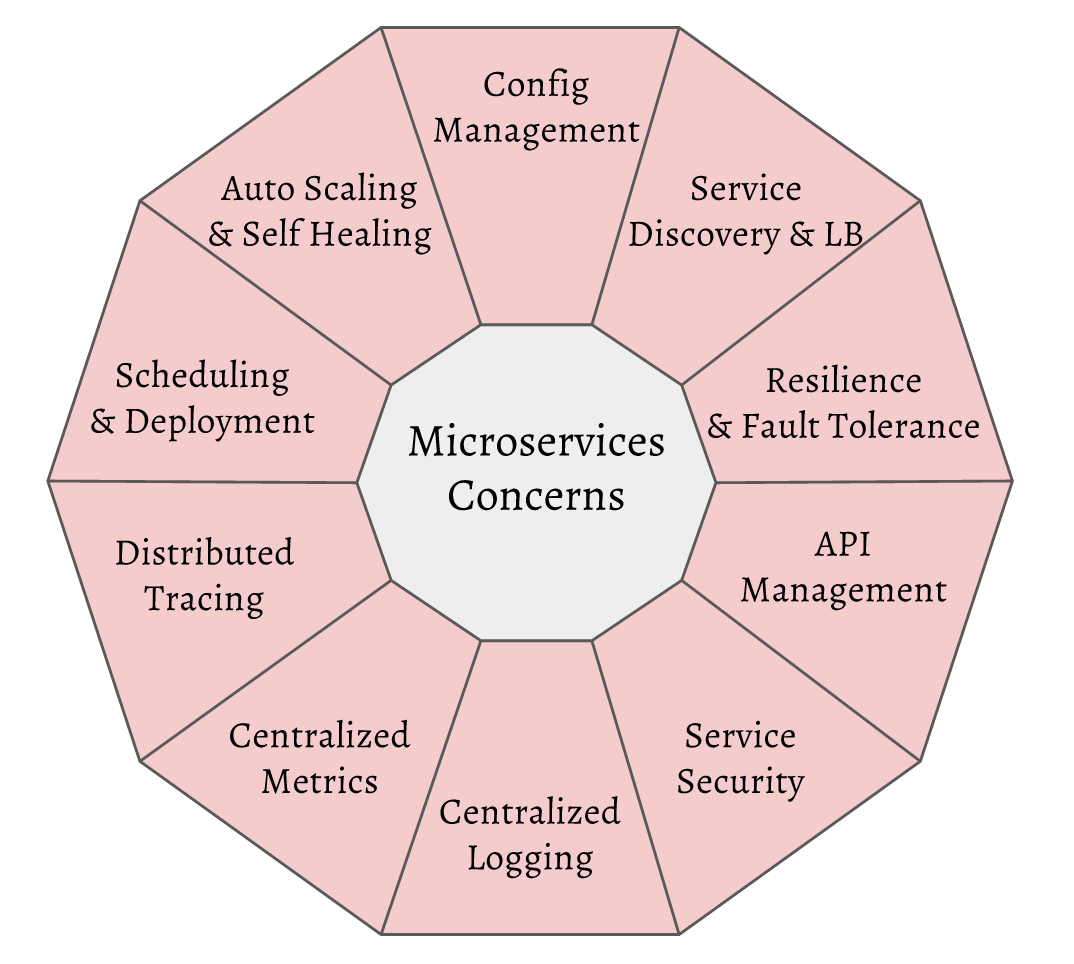
服务注册发现(Service Discovery)

  • CoreDNS
    https://coredns.io
  • Consul
    https://www.hashicorp.com/products/consul
  • Etcd
    https://github.com/coreos/etcd
  • Zookeeper
    https://zookeeper.apache.org
  • Eureka
    https://github.com/Netflix/eureka

负载均衡(Load Balancer)

  • Nginx
  • Haproxy

网关(API Gateway)

  • Kong

熔断(Circuit breaker)

  • Hystrix

分布式跟踪(Distributed Tracing)

  • Opentracing
    http://opentracing.io
    Opentracing是一个调用链路追踪规范,它类似于Zipkin和Google Dapper。
    与Zipkin不同的是,它定义了协议,并提供了多种语言的客户端库,但是没有提供最终存储和展示的实现。 用户可以自定义对接到不同的后端兼容层上,只要其兼容于Opentracing协议即可。
  • Jaeger
    https://github.com/jaegertracing/jaeger

参考资料

OpenTracing官方标准-中文版 https://github.com/opentracing-contrib/opentracing-specification-zh
Opentracing http://dmdgeeker.com/goBook/docs/ch11/opentracing.html
Uber Jaeger安装与使用 http://dmdgeeker.com/post/uber_jaeger/

监控(Monitoring)

  • Prometheus
    https://prometheus.io/

参考资料

Grafana https://grafana.com 监控展示面板

配置

  • confd

扩展资料

其他资料

CNCF(Cloud Native Computing Foundation)于 2015 年 7 月成立,隶属于 Linux 基金会,初衷围绕“云原生”服务云计算,致力于维护和集成开源技术,支持编排容器化微服务架构应用。

Projects


还不了解 CNCF?关于 CNCF 的三问三答! http://blog.daocloud.io/cncf-3/
Go使用grpc+http打造高性能微服务 https://mp.weixin.qq.com/s?__biz=MjM5OTcxMzE0MQ==&mid=2653370431&idx=1&sn=59175120599a0974eb32364c26421c09&chksm=bce4d8258b935133c80658431cde2dd5cfecb2cc6bd450d305e8242dc37288b9c0a9956e8423&mpshare=1&scene=1&srcid=1122W2gv4zaFKq6DaTg8jA0C#rd
关于负载均衡和服务发现,Google的经验在这里 http://blog.shurenyun.com/untitled-95/
12-Factor 软件设计12要素中文版 https://12factor.net/zh_cn/
Spring Cloud for Microservices Compared to Kubernetes

一些有用的综合Docker用法

crontab计划任务里面执行 docker中的程序,并指定账户

*/1 * * * * docker exec –user=www php-5.6-fpm-alpine bash -c “cd /tmp && pwd && ls && php -v > phpversion.log”

运行一个docker 命名且挂载目录映射端口

docker run -d –name php-5.6-fpm-alpine –restart=always -p 127.0.0.1:9001:9000 -v /tmp:/tmp -v /data:/data registry.cn-shanghai.aliyuncs.com/wwek/php:5.6-fpm-alpine

Docker 镜像加速

  • Docker 中国官方镜像加速 https://www.docker-cn.com/registry-mirror
    您可以配置 Docker 守护进程默认使用 Docker 官方镜像加速。这样您可以默认通过官方镜像加速拉取镜像,而无需在每次拉取时指定 registry.docker-cn.com。
    您可以在 Docker 守护进程启动时传入 –registry-mirror 参数:
$ docker --registry-mirror=https://registry.docker-cn.com daemon

为了永久性保留更改,您可以修改 /etc/docker/daemon.json 文件并添加上 registry-mirrors 键值。

{
  "registry-mirrors": ["https://registry.docker-cn.com"]
}

修改保存后重启 Docker 以使配置生效。

  • 阿里云 镜像加速器
    登录阿里云控制台 > 容器镜像服务 > 镜像加速器 按照后台给出的操作文档进行设置

免费的Docker私有镜像仓库

  • 阿里云
    登录阿里云控制台 > 容器镜像服务
    先设置”命名空间”,再在”镜像列表”,”创建镜像仓库”
    阿里云提供 阿里云Code,GitHub Bitbucket 私有GitLab 本地仓库 的源代码仓库的集成

  • 腾讯云
    登录腾讯云控制台 > 容器服务 > 镜像仓库
    先在”我的镜像”设置”命名空间”,再在”我的镜像”,”新建”
    腾讯云提供 Github GitLab 的源代码仓库的集成

管理工具

  • scope
    https://github.com/weaveworks/scope
    Monitoring, visualisation & management for Docker & Kubernetes
    可视化监控管理 Docker

  • kitematic
    Docker 官方桌面管理工具